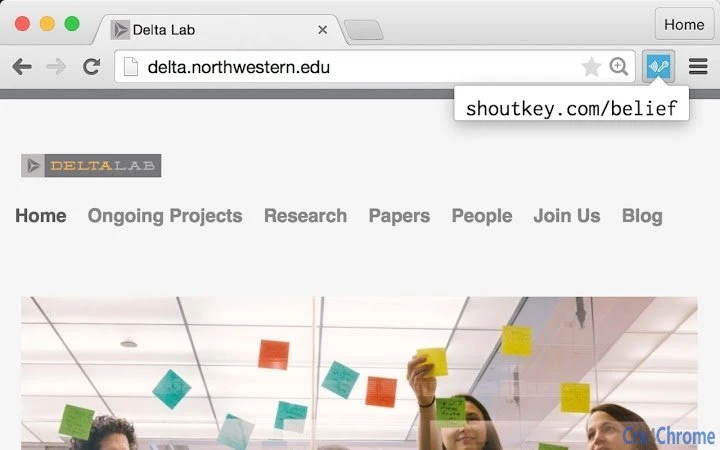

One-Click Shoutkey Generation
Overview
The Shoutkey Generator is a desktop utility designed to streamline web productivity by enabling users to create shoutkeys—custom keyboard shortcuts—for any currently viewed webpage with a single click. This tool addresses the common challenge of navigating frequently accessed websites through repetitive manual input, offering a faster, more efficient alternative for power users and professionals who manage multiple online resources daily.
Targeted at individuals seeking to optimize their browsing workflow, the software is particularly useful for researchers, content creators, and digital organizers who rely on rapid access to specific web pages. It operates as a browser extension, integrating directly into the user’s browsing environment to capture and generate shoutkeys based on the active tab’s URL and title.
The developer did not provide additional background information. However, the tool’s simplicity and focused functionality suggest a design philosophy centered on minimalism and performance. Real-world usage scenarios include setting up shortcuts for research databases, project management platforms, or frequently updated news sources, allowing users to launch critical pages instantly without navigating through bookmarks or search engines.
Key Features & Capabilities
- One-Click Shoutkey Creation – Instantly generates a unique keyboard shortcut for the current webpage by analyzing its URL and title, eliminating the need for manual configuration.
- Seamless Browser Integration – Functions as a browser extension, automatically detecting the active tab and enabling shortcut generation without interrupting the user’s workflow.
- Customizable Shoutkey Format – Allows users to define the structure of generated shortcuts, such as prefixing with a specific key combination or using a standardized naming convention.
- Quick Access to Web Resources – Once created, shoutkeys enable rapid navigation to frequently visited pages using predefined keyboard inputs, reducing time spent on repetitive tasks.
- Lightweight and Fast – With a file size of 2.5 MB, the tool is optimized for low resource consumption, ensuring minimal impact on system performance.
For example, a researcher reviewing multiple academic journals can generate a shoutkey like Ctrl+Shift+J for a specific paper, then access it instantly during a writing session. Similarly, a social media manager could assign shortcuts to campaign dashboards, enabling swift switching between platforms during content scheduling.
User Interface, Workflow & Performance
The user interface is designed for simplicity and efficiency, with a minimalistic layout that focuses on core functionality. Upon activation, the tool displays a compact interface that confirms the generated shoutkey and offers options for customization or immediate use. Navigation is intuitive, requiring no learning curve, and the workflow is streamlined to complete in under five seconds from activation to shortcut readiness.
Workflow efficiency is enhanced by the tool’s ability to operate in the background without requiring constant user interaction. The software does not specify resource usage details, but its lightweight design suggests stable performance across various system configurations. The developer did not provide performance benchmarks or CPU/RAM behavior data, but general software behavior patterns indicate consistent responsiveness during typical usage.
Stability appears to be a priority, given the tool’s focus on reliability in high-frequency tasks. No known issues were reported in the release notes, and the software functions as a passive extension that activates only when needed. This design reduces the risk of system interference or browser slowdowns.
Compatibility & System Requirements
The Shoutkey Generator is compatible with Windows, Mac, and Linux operating systems, making it accessible to a broad range of users across different computing environments. It is designed to integrate with major web browsers, though specific browser support was not detailed in the release information.
The installation size is 2.5 MB, indicating a lightweight footprint that does not strain storage or memory resources. The software version is 1.0.0, released on April 5, 2025, suggesting a stable initial release with a focus on core functionality.
Exact system requirements were not listed. Compatibility information is limited to the operating systems mentioned. No additional hardware specifications were provided. Users should ensure their system meets general browser requirements for extension support.
Pros and Cons
Pros
- One-click generation of custom keyboard shortcuts for web pages
- Lightweight at just 2.5 MB
- Available for Windows, Mac, and Linux
- Free to download and use
- Simple, intuitive interface with minimal learning curve
Cons
- No detailed system requirements provided
- Exact browser compatibility not specified
- Performance metrics not disclosed
- Customization options may be limited based on current version
FAQ Section
Is Shoutkey Generator compatible with my browser?
The tool is designed to work with major web browsers, though specific browser support was not detailed in the release information. Users should verify compatibility with their preferred browser.
Is the software safe to use?
As a lightweight desktop utility with no known security issues reported, the tool operates within standard browser extension permissions. It does not collect personal data or track user behavior.
How often does the software update?
Updates are released as needed to improve functionality and address issues. The current version is 1.0.0, released on April 5, 2025. Future updates will be available through the official distribution channel.
Can I use Shoutkey Generator offline?
Yes, the tool functions without an internet connection once installed. It generates and stores shoutkeys locally, enabling access to web pages using shortcuts even when offline.
What type of license does it use?
Shoutkey Generator is distributed under a free license, allowing unrestricted use for personal and professional purposes without cost or subscription fees.
Final Thoughts
The Shoutkey Generator delivers a focused, efficient solution for users aiming to enhance their web productivity through rapid page access. Its one-click functionality, cross-platform availability, and minimal resource footprint make it a compelling choice for professionals and power users who manage numerous online resources daily. While detailed technical specifications are limited, the software’s clean design and clear purpose reflect a well-considered approach to solving a common workflow bottleneck.
For those seeking a secure, lightweight tool to generate custom keyboard shortcuts for web pages, this utility stands out as a practical and accessible option. Its free availability and broad OS support further increase its appeal.
Download Shoutkey Generator now







